
Some time has passed since Apple unveiled and shipped its completely redesigned 2016 MacBook Pro. Currently, the most criticized design decision remains the elimination of the built-in SD card slot. With the new MacBook Pro retaining only four Thunderbolt 3 (USB Type-C) ports and a 3.5mm headphone jack, countless users have been forced to repurchase new USB cables and dongles for legacy peripherals.
In response, an accessory design manufacturer launched a crowdfunding campaign on Kickstarter for a new product: the “HyperDrive.” Shaped as a slim, rectangular bar that snaps directly onto the laptop, this multi-port all-in-one hub has already attracted more than 5,600 backers.
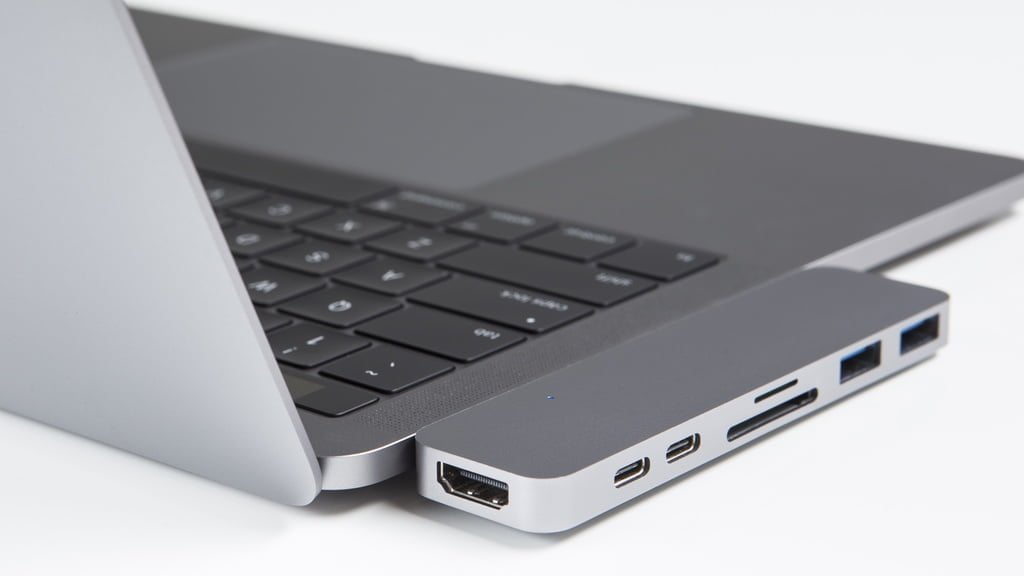
However, to be frank, this is a design that evokes noticeable hesitation. Three fundamental issues raise serious doubts: physical structural mating, the power delivery module, and data transfer throughput.
Physical Structural Mating of HyperDrive and MacBook Pro
The HyperDrive latches flush against the side of the MacBook Pro using dual male USB Type-C connectors (as shown above), expanding the laptop’s connectivity to include HDMI, two USB-C female ports, an SD card reader, and two USB Type-A female ports.
Yet, this direct-docking mechanical design introduces a structural concern.
💔
Because the HyperDrive attaches nearly flush to the chassis flank, it essentially behaves as a rigid physical extension of the laptop itself—without adequate mechanical stress-relief support. This means that whenever you lift or tilt the MacBook Pro (for example, picking it up by the right side with one hand), considerable torsional stress concentrates squarely on the HyperDrive dock and its dual USB-C plugs.
While users are unlikely to be careless enough to snap the USB-C plugs clean off or pry open the aluminum unibody, microscopic physical deformation over time is virtually inevitable. Accumulated stress can cause loose electrical contacts or warping along the chassis seam.
A far better approach is simply embracing USB Type-C as the new standard and gradually upgrading aging legacy cables. Buying a flexible USB Type-A to Type-C dongle cable is both more affordable and lighter than carrying a rigid HyperDrive block.
HyperDrive Power Delivery Module
The USB 3.1 Type-C specification supports up to 5A (100W) of Power Delivery, easily satisfying the requirements of most high-draw peripherals. Power delivery capacity itself is not inherently problematic.
However, Apple’s USB controllers are not indestructible; past generations have suffered localized port failures under erratic electrical loads. When a single USB controller must negotiate multiple voltage shifts from various external peripherals simultaneously, thermal and electrical burdens escalate on the controller chip. Since the MacBook Pro provides four independent USB ports, a safer practice is dedicating individual ports to distinct devices rather than daisy-chaining multiple loads through a single bridge.
Data Transfer Throughput
The USB 3.1 Type-C interface delivers theoretical transfer speeds up to 10 Gbps (compared to 5 Gbps for USB 3.0). However, that maximum bandwidth is achievable primarily when dedicated to a single peripheral. As multiple external drives and displays are connected simultaneously, bus bandwidth is inevitably split. When multiple peripherals access the bus concurrently, transfer speeds drop dramatically to avoid packet collisions and dropped frames. Dedicating individual ports to separate peripherals allows independent controller chips to handle their own data streams without mutual contention.
Evaluating these three concerns, while mechanical deformation remains the chief structural flaw, the power and bandwidth trade-offs also diminish the necessity of an all-in-one docking bar. If your primary external need is simply accessing SD cards, investing in a standalone, flexible USB multi-card reader (such as a Transcend multi-card reader) is far more cost-effective. Furthermore, if a single port on a standalone reader fails, it won’t disable your entire docking setup.
Moreover, because the HyperDrive relies strictly on dual, precisely spaced USB Type-C male prongs, it cannot be connected via generic extension cables to other desktop PCs or standard laptops, severely limiting its overall versatility.
Support Independent Perspectives & In-Depth Insights
Every thoughtful analysis and candid critique comes from our dedication to truth and quality. We choose not to follow sensational algorithms or clickbait headlines.
Sustaining independent research requires reader support. Make a one-time or monthly contribution, securely processed by Google.
Payments secured by Google · Manage or cancel anytime in your Google Account



Comments